Homework 3: Mutability, Trees, Iterators, Generators
Due by 11:59pm on Wednesday, July 15
Instructions
Download hw03.zip. Inside the archive, you will find a file called
hw03.py, along with a copy of the ok autograder.
Submission: When you are done, submit the assignment to Gradescope. You may submit more than once before the deadline; only the final submission will be scored. Check that you have successfully submitted your code on Gradescope. See Lab 0 for more instructions on submitting assignments.
Using Ok: If you have any questions about using Ok, please refer to this guide.
Readings: You might find the following references useful:
Grading: Homework is graded based on correctness. Each incorrect problem will decrease the total score by one point. This homework is out of 2 points.
Required Questions
Consult the drop-down if you need a refresher on mutability. It's
okay to skip directly to the questions and refer back
here should you get stuck.
The two most common mutation operations for lists are item assignment and the
append method.
>>> s = [1, 3, 4]
>>> t = s  # A second name for the same list
>>> t[0] = 2  # this changes the first element of the list to 2, affecting both s and t
>>> s
[2, 3, 4]
>>> s.append(5)  # this adds 5 to the end of the list, affecting both s and t
>>> t
[2, 3, 4, 5]
There are many other list mutation methods:
append(elem): Addelemto the end of the list. ReturnNone.extend(s): Add all elements of iterablesto the end of the list. ReturnNone.insert(i, elem): Insertelemat indexi. Ifiis greater than or equal to the length of the list, thenelemis inserted at the end. This does not replace any existing elements, but only adds the new elementelem. ReturnNone.remove(elem): Remove the first occurrence ofelemin list. ReturnNone. Errors ifelemis not in the list.pop(i): Remove and return the element at indexi.pop(): Remove and return the last element.
Dictionaries also have item assignment (often used) and pop (rarely used).
>>> d = {2: 3, 4: 16}
>>> d[2] = 4
>>> d[3] = 9
>>> d
{2: 4, 4: 16, 3: 9}
>>> d.pop(4)
16
>>> d
{2: 4, 3: 9}
If you need a refresher on generators, this may be helpful to read:
yield statements within the body of the function instead of return
statements. Calling a generator function will return a generator object and
will not execute the body of the function.
For example, let's consider the following generator function:
def countdown(n):
    print("Beginning countdown!")
    while n >= 0:
        yield n
        n -= 1
    print("Blastoff!")
Calling countdown(k) will return a generator object that counts down from k
to 0. Since generators are iterators, we can call iter on the resulting
object, which will simply return the same object. Note that the body is not
executed at this point; nothing is printed and no numbers are outputted.
>>> c = countdown(5)
>>> c
<generator object countdown ...>
>>> c is iter(c)
True
So how is the counting done? Again, since generators are iterators, we call
next on them to get the next element! The first time next is called,
execution begins at the first line of the function body and continues until the
yield statement is reached. The result of evaluating the expression in the
yield statement is returned. The following interactive session continues
from the one above.
>>> next(c)
Beginning countdown!
5
Unlike functions we've seen before in this course, generator functions can
remember their state. On any consecutive calls to next, execution picks up
from the line after the yield statement that was previously executed. Like
the first call to next, execution will continue until the next yield
statement is reached. Note that because of this, Beginning countdown! doesn't
get printed again.
>>> next(c)
4
>>> next(c)
3
The next 3 calls to next will continue to yield consecutive descending
integers until 0. On the following call, a StopIteration error will be
raised because there are no more values to yield (i.e. the end of the function
body was reached before hitting a yield statement).
>>> next(c)
2
>>> next(c)
1
>>> next(c)
0
>>> next(c)
Blastoff!
StopIteration
Separate calls to countdown will create distinct generator objects with their
own state. Usually, generators shouldn't restart. If you'd like to reset the
sequence, create another generator object by calling the generator function
again.
>>> c1, c2 = countdown(5), countdown(5)
>>> c1 is c2
False
>>> next(c1)
5
>>> next(c2)
5
Here is a summary of the above:
- A generator function has a
yieldstatement and returns a generator object. - Calling the
iterfunction on a generator object returns the same object without modifying its current state. - The body of a generator function is not evaluated until
nextis called on a resulting generator object. Calling thenextfunction on a generator object computes and returns the next object in its sequence. If the sequence is exhausted,StopIterationis raised. A generator "remembers" its state for the next
nextcall. Therefore,the first
nextcall works like this:- Enter the function and run until the line with
yield. - Return the value in the
yieldstatement, but remember the state of the function for futurenextcalls.
- Enter the function and run until the line with
And subsequent
nextcalls work like this:- Re-enter the function, start at the line after the
yieldstatement that was previously executed, and run until the nextyieldstatement. - Return the value in the
yieldstatement, but remember the state of the function for futurenextcalls.
- Re-enter the function, start at the line after the
- Calling a generator function returns a brand new generator object (like
calling
iteron an iterable object). - A generator should not restart unless it's defined that way. To start over from the first element in a generator, just call the generator function again to create a new generator.
Another useful tool for generators is the yield from statement. yield from
will yield all values from an iterator or iterable.
>>> def gen_list(lst):
...     yield from lst
...
>>> g = gen_list([1, 2, 3, 4])
>>> next(g)
1
>>> next(g)
2
>>> next(g)
3
>>> next(g)
4
>>> next(g)
StopIteration
Another refresher this time for iterators:
list function.
Examples of iterables we have seen so far in Python include strings,
lists, tuples, and ranges.
>>> for x in "cat":
...     print(x)
c
a
t
>>> [x*2 for x in (1, 2, 3)]
[2, 4, 6]
>>> list(range(4))
[0, 1, 2, 3]
Note the abstraction present here: given some iterable object, we have a set of defined actions that we can take with it. In this discussion, we will peak below the abstraction barrier and examine how iterables are implemented "under the hood".
In Python, iterables are formally implemented as objects that can be passed into the built-in iter
function to produce an iterator. An iterator is another type of object
that can produce elements one at a time with the next function.
iter(iterable): Returns an iterator over the elements of the given iterable.next(iterator): Returns the next element in an iterator, or raises aStopIterationexception if there are no elements left.
For example, a list of numbers is an iterable,
since iter gives us an iterator over the given sequence, which
we can navigate using the next function:
>>> lst = [1, 2, 3]
>>> lst_iter = iter(lst)
>>> lst_iter
<list_iterator object ...>
>>> next(lst)
1
>>> next(lst)
2
>>> next(lst)
3
>>> next(lst)
StopIteration
Iterators are very simple. There is only a mechanism to get the next element
in the iterator: next. There is no way to index into an iterator
and there is no way to go backward. Once an iterator has produced an element,
there is no way for us to get that element again unless we store it.
Note that iterators themselves are iterables: calling iter on an iterator
simply returns the same iterator object.
For example, we can see what happens when we use iter and next with a list:
>>> lst = [1, 2, 3]
>>> next(lst)             # Calling next on an iterable
TypeError: 'list' object is not an iterator
>>> list_iter = iter(lst) # Creates an iterator for the list
>>> next(list_iter)       # Calling next on an iterator
1
>>> next(iter(list_iter)) # Calling iter on an iterator returns itself
2
>>> for e in list_iter:   # Exhausts remainder of list_iter
...     print(e)
3
>>> next(list_iter)       # No elements left!
StopIteration
>>> lst                   # Original iterable is unaffected
[1, 2, 3]
The map and filter functions we learned earlier in class return iterator objects.
Refresher for trees:
tree is a data structure that represents a hierarchy of information. A file system is a good example of a tree structure. For example, within your cs61a folder, you have folders separating your projects, lab assignments, and homework. The next level is folders that separate different assignments, hw01, lab01, hog, etc., and inside those are the files themselves, including the starter files and ok. Below is an incomplete diagram of what your cs61a directory might look like.
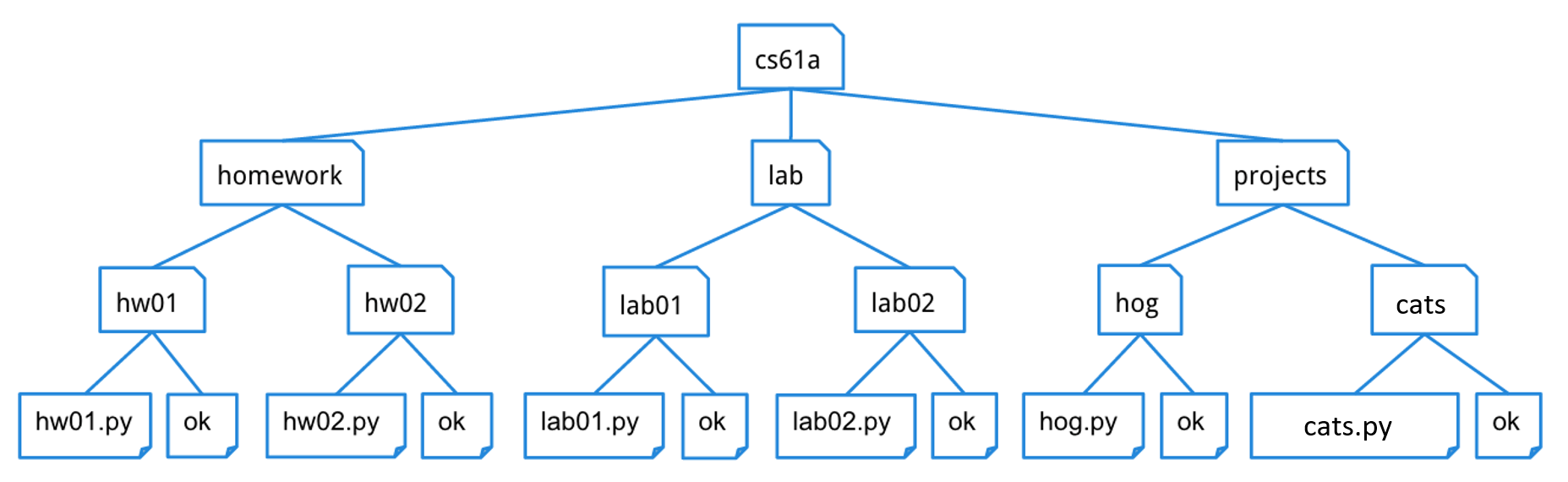
As you can see, unlike trees in nature, the tree abstract data type is drawn with the root at the top and the leaves at the bottom.
For a tree t:
- Its root label can be any value, and
label(t)returns it. - Its branches are trees, and
branches(t)returns a list of branches. - An identical tree can be constructed with
tree(label(t), branches(t)). - You can call functions that take trees as arguments, such as
is_leaf(t). - That's how you work with trees. No
t == xort[0]orx in torlist(t), etc. - There's no way to change a tree (that doesn't violate an abstraction barrier).
Here's an example tree t1, for which its branch branches(t1)[1] is t2.
t2 = tree(5, [tree(6), tree(7)])
t1 = tree(3, [tree(4), t2])
A path is a sequence of trees in which each is the parent of the next.
Mutability
Q1: Inventory Pickup
Implement the function inventory_pickup which has a list inventory, a list items, and an argument capacity.
The function should mutate the list inventory in place and return the same mutated list. The inventory has a length/size
of capacity and after all the items in items have been processed, if the inventory has more than capacity elements,
remove elements from the front of the inventory (oldest first) until inventory has exactly capacity elements to make space
for the items getting picked up. The inventory must be mutated, you cannot replace or copy the inventory each time,
and if another variable is used in place of inventory, it must also change.
Timing: All items are processed first (removing duplicates + appending), and only AFTER all items have been added do you check and trim for capacity. Trimming may require removing more than one element.
For each item in items:
- Remove all existing copies of the item (0, 1, 2+) that are currently in the
inventory - Append one copy of the item to the end of the
inventory
Important: Mutate the original inventory and return the mutated inventory. Do not return a copy of inventory.
itemsmay be the SAME list object asinventory. Try to think about what happens if you loop overitemswhileinventory(the same list) is being mutated underneath you, and what happens if you remove multiple matching elements from a list while iterating through it.
def inventory_pickup(inventory: list, items: list, capacity: int) -> list:
    """Simulate picking up every item in items and add them, one at a time, to the inventory IN PLACE.
    The function should return the mutated inventory.

    >>> inv = [1, 2, 1, 3, 1]
    >>> inv_test = inventory_pickup(inv, [1, 4], 10)
    >>> inv_test
    [2, 3, 1, 4]

    >>> inv2 = [11, 12, 13]
    >>> inv2_test = inventory_pickup(inv2, inv2, 7)
    >>> inv2_test
    [11, 12, 13]

    >>> inv3 = [1, 2, 1, 3, 1]
    >>> check_mutation = inv3
    >>> inv3_test = inventory_pickup(inv3, inv3, 3)
    >>> inv3_test
    [2, 3, 1]
    >>> check_mutation is inv3_test
    True

    >>> inv4 = [1, 2, 3, 4]
    >>> inv4_test = inventory_pickup(inv4, [5, 6, 7, 8, 9, 10], 10)
    >>> inv4_test
    [1, 2, 3, 4, 5, 6, 7, 8, 9, 10]

    >>> inv5 = [1, 2, 3, 4]
    >>> inv5_test = inventory_pickup(inv5, [5, 6, 7, 8], 6)
    >>> inv5_test
    [3, 4, 5, 6, 7, 8]

    >>> inv6 = ['hello', 'world']
    >>> inv6_test = inventory_pickup(inv6, ['hi', 'hello'], 4)
    >>> inv6_test
    ['world', 'hi', 'hello']
    """
    "*** YOUR CODE HERE ***"
Use Ok to test your code:
python3 ok -q inventory_pickupTrees
Q2: Finding Berries!
The squirrels on campus need your help! There are a lot of trees on campus and
the squirrels would like to know which ones contain berries. Define the function
berry_finder, which takes in a tree and returns True if the tree contains a
node with the value 'berry' and False otherwise.
Hint: To iterate through each of the branches of a particular tree, you can consider using a
forloop to get each branch.
def berry_finder(t):
    """Returns True if t contains a node with the value 'berry' and
    False otherwise.

    >>> scrat = tree('berry')
    >>> berry_finder(scrat)
    True
    >>> sproul = tree('roots', [tree('branch1', [tree('leaf'), tree('berry')]), tree('branch2')])
    >>> berry_finder(sproul)
    True
    >>> numbers = tree(1, [tree(2), tree(3, [tree(4), tree(5)]), tree(6, [tree(7)])])
    >>> berry_finder(numbers)
    False
    >>> t = tree(1, [tree('berry',[tree('not berry')])])
    >>> berry_finder(t)
    True
    """
    "*** YOUR CODE HERE ***"
Use Ok to test your code:
python3 ok -q berry_finderQ3: Size
Define the function size_of_tree, which takes in a tree t and returns
the number of entries it contains.
def size_of_tree(t):
    """Return the number of entries in the tree.
    >>> numbers = tree(1, [tree(2), tree(3, [tree(4), tree(5)]), tree(6, [tree(7)])])
    >>> print_tree(numbers)
    1
      2
      3
        4
        5
      6
        7
    >>> size_of_tree(numbers)
    7
    """
    "*** YOUR CODE HERE ***"
Use Ok to test your code:
python3 ok -q size_of_treeQ4: Make Path
Implement make_path, which takes a tree t with unique labels and a list p
that starts with the root label of t. It returns the tree u with the fewest
nodes for which has_path(u, p) returns True and has_path(u, q) returns
True for all lists q for which has_path(t, q) returns True.
(That is, u has all the paths of t as well as a path with labels p.)
Each node in u that does not correspond to a node in t should be placed last
in its parent's list of branches. Assume that the labels of t are unique.
If has_path(t, p), then make_path(t, p) should return a tree identical (in
structure and labels) to t.
def make_path(t, p):
    """Return a tree with all of the nodes of t and a path with labels p.

    >>> t2 = tree(5, [tree(6), tree(7)])
    >>> t1 = tree(3, [tree(4), t2])
    >>> make_path(t1, [3, 5, 7]) == t1
    True
    >>> print_tree(make_path(t1, [3, 8, 9, 1]))
    3
      4
      5
        6
        7
      8
        9
          1
    >>> print_tree(make_path(t1, [3, 4, 8, 9]))
    3
      4
        8
          9
      5
        6
        7
    >>> print_tree(make_path(tree(2, [tree(1), t1]), [2, 3, 5, 6, 8]))
    2
      1
      3
        4
        5
          6
            8
          7
    """
    assert p[0] == label(t), 'It is not possible to make this path'
    if len(p) == 1:
        return ____
    new_branches = []
    found_p1 = False
    for b in branches(t):
        if ____:
            "*** YOUR CODE HERE ***"
        else:
            new_branches.append(b)
    if not found_p1:
        new_branches.append(make_path(____, ____))
    return tree(____, new_branches)
Because of the assert, the base case condition len(p) == 1 is enough to confirm that p == [label(t)]. In this case, there are no additional nodes needed to ensure that a path labeled p is in t.
To minimize the number of nodes added to the tree, first we look for a branch that can be extended. The name found_p1 will determine whether to add an additional branch to new_branches that does not correspond to a branch in branches(t). Updating it to True when a branch is found with label(b) == p[1] ensures that the path is added only to this branch.
What recursive calls will you make?
make_path(b, p[1:]) can only be called on a b whose label is p[1]. You
either find such a branch or make one with tree(p[1]).
What type of values do they return?
The recursive call returns a tree that contains a path with labels p[1:].
What do the possible return values mean?
This return value is a branch of the tree returned by make_path(t, p).
How can you use those return values to complete your implementation?
Place the return value in the list of new_branches.
Since you've already asserted that p[0] == label(t), if p has length 1 then
t contains a path with labels p, so you can just return t.
If p[1] is a label of a branch, then a path should be made
through that branch. Otherwise, a new branch must be made.
Search through each branch to find one whose label is p[1], then append the
result of a recursive call on that branch to new_branches.
In the case that no branch has label p[1], create a new branch with
tree(p[1]), use make_path to build the rest of the branch, and append that
result to new_branches.
Use Ok to test your code:
python3 ok -q make_pathIterators / Generators
Q5: Merge
Implement merge(incr_a, incr_b), which takes two iterables incr_a and incr_b whose
elements are ordered. merge yields elements from incr_a and incr_b in sorted
order, eliminating repetition. You may assume incr_a and incr_b themselves do not
contain repeats, and that none of the elements of either are None.
You may not assume that the iterables are finite; either may produce an infinite
stream of results.
You will probably find it helpful to use the two-argument version of the built-in
next function: next(incr, v) is the same as next(incr), except that instead of
raising StopIteration when incr runs out of elements, it returns v.
See the doctest for examples of behavior.
def merge(incr_a, incr_b):
    """Yield the elements of strictly increasing iterables incr_a and incr_b, removing
    repeats. Assume that incr_a and incr_b have no repeats. incr_a or incr_b may or may not
    be infinite sequences.

    >>> m = merge([0, 2, 4, 6, 8, 10, 12, 14], [0, 3, 6, 9, 12, 15])
    >>> type(m)
    <class 'generator'>
    >>> list(m)
    [0, 2, 3, 4, 6, 8, 9, 10, 12, 14, 15]
    >>> def big(n):
    ...    k = 0
    ...    while True: yield k; k += n
    >>> m = merge(big(2), big(3))
    >>> [next(m) for _ in range(11)]
    [0, 2, 3, 4, 6, 8, 9, 10, 12, 14, 15]
    """
    iter_a, iter_b = iter(incr_a), iter(incr_b)
    next_a, next_b = next(iter_a, None), next(iter_b, None)
    "*** YOUR CODE HERE ***"
Use Ok to test your code:
python3 ok -q mergeQ6: Yield Paths
Write a generator function yield_paths that takes a tree t and a target target. It yields each path from the root of t to any node with the label target.
Each path should be returned as a list of labels from the root to the matching node. The paths can be yielded in any order.
Hint: If you are having trouble getting started, think about how you would approach this problem if it was not a generator function. What would the recursive steps look like?
Hint: Remember, you can iterate over generator objects because they are a type of iterator!
def yield_paths(t, target):
    """
    Yields all possible paths from the root of t to a node with the label
    target as a list.

    >>> t1 = tree(1, [tree(2, [tree(3), tree(4, [tree(6)]), tree(5)]), tree(5)])
    >>> print_tree(t1)
    1
      2
        3
        4
          6
        5
      5
    >>> next(yield_paths(t1, 6))
    [1, 2, 4, 6]
    >>> path_to_5 = yield_paths(t1, 5)
    >>> sorted(list(path_to_5))
    [[1, 2, 5], [1, 5]]

    >>> t2 = tree(0, [tree(2, [t1])])
    >>> print_tree(t2)
    0
      2
        1
          2
            3
            4
              6
            5
          5
    >>> path_to_2 = yield_paths(t2, 2)
    >>> sorted(list(path_to_2))
    [[0, 2], [0, 2, 1, 2]]
    """
    if label(t) == target:
        yield ____
    for b in branches(t):
        for ____ in ____:
            yield ____
Use Ok to test your code:
python3 ok -q yield_pathsSurvey
This survey counts towards one of the 2 survey points for the class. There are no extensions for this point.
Q7: Mid-Semester Feedback
As part of this assignment, fill out the Mid-Semester Feedback form.
Once you finish the survey, you will be presented with a passphrase. Put
this passphrase, as a string, on the line that says
passphrase = 'REPLACE_THIS_WITH_PASSPHRASE' in the Python file for this assignment.
E.g. if the passphrase is abc, then the line should be passphrase = 'abc'.
Use Ok to test your code:
python3 ok -q midsem_surveyCheck Your Score Locally
You can locally check your score on each question of this assignment by running
python3 ok --scoreThis does NOT submit the assignment! When you are satisfied with your score, submit the assignment to Gradescope to receive credit for it.
Submit Assignment
Submit this assignment by uploading any files you've edited to the appropriate Gradescope assignment. Lab 00 has detailed instructions.
Exam Practice
Homework assignments will also contain prior exam-level questions for you to take a look at. These questions have no submission component; feel free to attempt them if you'd like a challenge!
- Summer 2019 MT Q3: Boxing Day
- Fall 2021 MT2 Q3bc: Shang-Chi
- Fall 2023 Final Q2: Path Math