Homework 6: SQL
Due by 11:59pm on Wednesday, August 5
Instructions
This homework is quite long, it's in your best interest to start early.
Download hw06.zip. Inside the archive, you will find a file called
hw06.sql, along with a copy of the ok autograder.
Submission: When you are done, submit the assignment to Gradescope. You may submit more than once before the deadline; only the final submission will be scored. Check that you have successfully submitted your code on Gradescope. See Lab 0 for more instructions on submitting assignments.
Using Ok: If you have any questions about using Ok, please refer to this guide.
Readings: You might find the following references useful:
Grading: Homework is graded based on correctness. Each incorrect problem will decrease the total score by one point. This homework is out of 2 points.
Required Questions
To check your progress, you can run sqlite3 directly by running:
python3 sqlite_shell.py --init hw06.sqlYou should also check your work using ok:
python3 okVisualizing SQL
The CS61A SQL Web Interpreter is a great tool for visualizing and debugging SQL statements!
To get started, visit code.cs61a.org and hit Start SQL interpreter on the launch screen.
Most tables used in assignments are already available for use, so let's try to execute a SELECT statement:
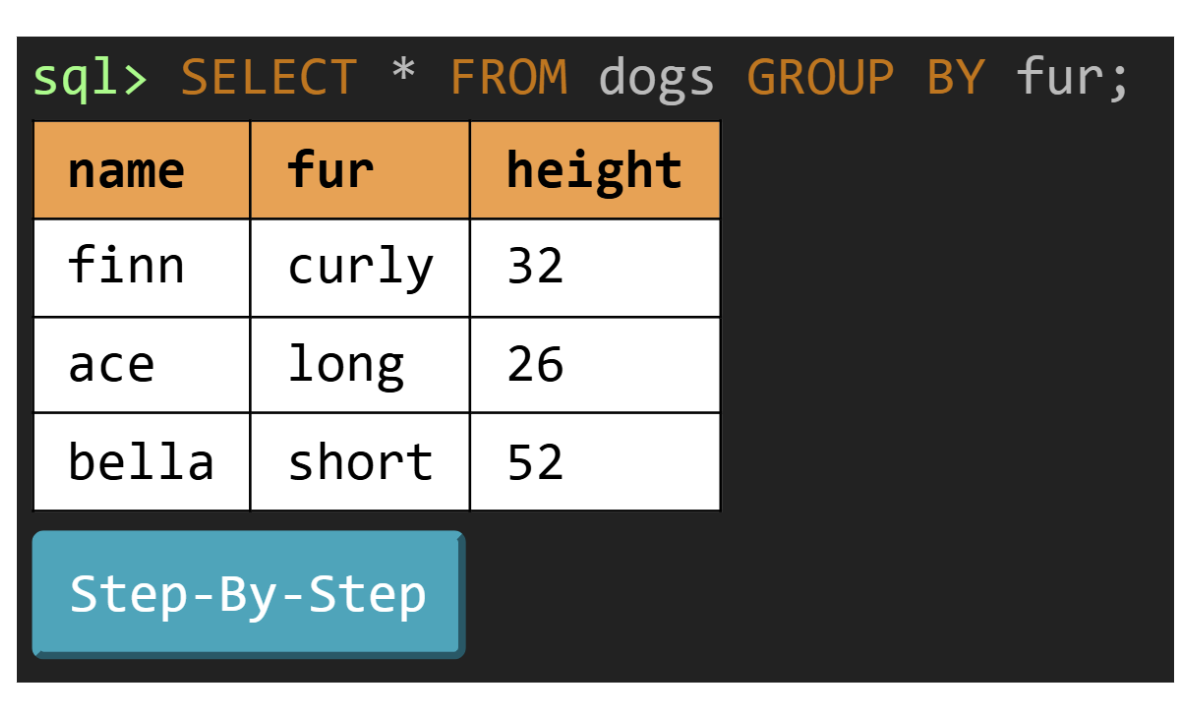
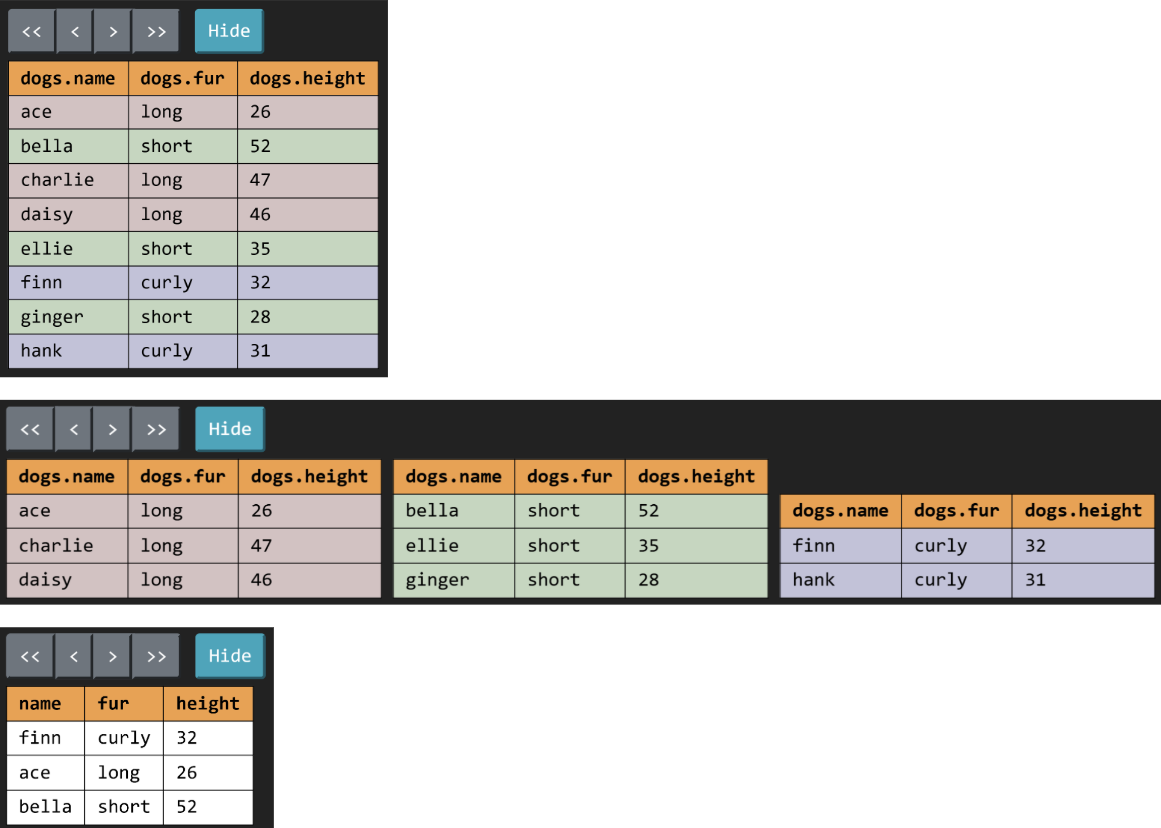
In addition to displaying a visual representation of the output table, the "Step-by-step" button lets us step through the SQL execution and visualize every transformation that takes place. For our example, clicking on the next arrow will produce the following visuals, demonstrating exactly how SQL is grouping our rows to form the final output!
Topics
Consult this section if you need a refresher on the material for this lab. It's okay to skip directly to the questions and refer back here should you get stuck.
SQL Basics
Example Table
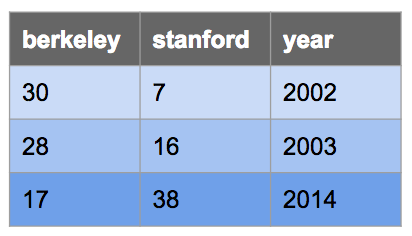
Here's a table called big_game used in the examples below, which records the
scores for the Big Game each year. This table has three columns: berkeley,
stanford, and year.
CREATE TABLE big_game (
    berkeley INTEGER, stanford INTEGER, year INTEGER);

INSERT INTO big_game (berkeley, stanford, year) VALUES
    (30, 7, 2002),
    (28, 16, 2003),
    (17, 38, 2014);
You can view it in sqlite like this:
sqlite> .mode column
sqlite> SELECT * FROM big_game;
berkeley  stanford  year
--------  --------  ----
30        7         2002
28        16        2003
17 38 2014.mode column command doesn't work in your version of sqlite, that's ok. Just ignore it.
Selecting From Tables
Typically, we will create a new table from existing tables using a SELECT statement:
SELECT [columns] FROM [tables] WHERE [condition] ORDER BY [columns] LIMIT [limit];Let's break down this statement:
SELECT [columns]tells SQL that we want to include the given columns in our output table;[columns]is a comma-separated list of column names, and*can be used to select all columnsFROM [table]tells SQL that the columns we want to select are from the given tableWHERE [condition]filters the output table by only including rows whose values satisfy the given[condition], a boolean expressionORDER BY [columns]orders the rows in the output table by the given comma-separated list of columns; by default, values are sorted in ascending order (ASC), but you can use DESC to sort in descending orderLIMIT [limit]limits the number of rows in the output table by the integer[limit]
Here are some examples:
Select all of Berkeley's scores from the big_game table, but only include
scores from years past 2002:
sqlite> SELECT berkeley FROM big_game WHERE year > 2002;
28
17
Select the scores for both schools in years that Berkeley won:
sqlite> SELECT berkeley, stanford FROM big_game WHERE berkeley > stanford;
30|7
28|16
Select the years that Stanford scored more than 15 points:
sqlite> SELECT year FROM big_game WHERE stanford > 15;
2003
2014
SQL operators
Expressions in the SELECT, WHERE, and ORDER BY clauses can contain
one or more of the following operators:
- comparison operators:
=,>,<,<=,>=,<>or!=("not equal") - boolean operators:
AND,OR - arithmetic operators:
+,-,*,/ - concatenation operator:
||
Output the ratio of Berkeley's score to Stanford's score each year:
sqlite> select berkeley * 1.0 / stanford from big_game;
0.447368421052632
1.75
4.28571428571429
Output the sum of scores in years where both teams scored over 10 points:
sqlite> select berkeley + stanford from big_game where berkeley > 10 and stanford > 10;
55
44
Output a table with a single column and single row containing the value "hello world":
sqlite> SELECT "hello" || " " || "world";
hello worldSQL Aggregation
Here's another example table, this time about flights:
CREATE TABLE flights (
    departure TEXT, arrival TEXT, price INTEGER);

INSERT INTO flights (departure, arrival, price) VALUES
    ('SFO', 'LAX', 97),
    ('SFO', 'AUH', 848),
    ('LAX', 'SLC', 115),
    ('SFO', 'PDX', 192),
    ('AUH', 'SEA', 932),
    ('SLC', 'PDX', 79),
    ('SFO', 'LAS', 40),
    ('SLC', 'LAX', 117),
    ('SEA', 'PDX', 32),
    ('SLC', 'SEA', 42),
    ('SFO', 'SLC', 97),
    ('LAS', 'SLC', 50),
    ('LAX', 'PDX', 89);
Applying an aggregate function
such as MAX(column) combines the values from multiple rows into an output row.
By default, we combine the values of all rows in the table. For example, if we
wanted to count the number of rows in our flights table, we could use:
sqlite> SELECT COUNT(*) from FLIGHTS;
13
What if we wanted to group together the values in similar rows and perform the
aggregation operations within those groups? We use a GROUP BY clause.
Here's another example. For each unique departure, collect all of the rows having
the same departure airport into a group. Then, select the price column and
apply the MIN aggregation to recover the price of the cheapest departure from
that group. The end result is a table of departure airports and the cheapest
departing flight.
sqlite> SELECT departure, MIN(price) FROM flights GROUP BY departure;
departure  MIN(price)
---------  ----------
AUH        932
LAS        50
LAX        89
SEA        32
SFO        40
SLC        42
Just like how we can filter out rows with WHERE, we can also filter out
groups with HAVING. Typically, a HAVING clause should use an aggregation
function. Suppose we want to see all airports with at least two departures:
sqlite> SELECT departure FROM flights GROUP BY departure HAVING COUNT(*) >= 2;
departure
---------
LAX
SFO
SLC
Note that the COUNT(*) aggregate just counts the number of rows in each group.
Say we want to count the number of distinct airports instead. Then, we could
use the following query:
sqlite> SELECT COUNT(DISTINCT departure) AS destinations FROM flights;
destinations
------------
6
This enumerates all the different departure airports available in our flights
table (in this case: SFO, LAX, AUH, SLC, SEA, and LAS).
Dog Data
In each question below, you will define a new table based on the following tables about dogs.
CREATE TABLE parents (parent TEXT, child TEXT);

INSERT INTO parents VALUES
  ('ace', 'bella'),
  ('ace', 'charlie'),
  ('daisy', 'hank'),
  ('finn', 'ace'),
  ('finn', 'daisy'),
  ('finn', 'ginger'),
  ('ellie', 'finn');

CREATE TABLE dogs (name TEXT, fur TEXT, height INTEGER);

INSERT INTO dogs VALUES
  ('ace',     'long',  26),
  ('bella',   'short', 52),
  ('charlie', 'long',  47),
  ('daisy',   'long',  46),
  ('ellie',   'short', 35),
  ('finn',    'curly', 32),
  ('ginger',  'short', 28),
  ('hank',    'curly', 31);

CREATE TABLE sizes (size TEXT, min INTEGER, max INTEGER);

INSERT INTO sizes VALUES
  ('toy',      24, 28),
  ('mini',     28, 35),
  ('medium',   35, 45),
  ('standard', 45, 60);
The parents table contains one row for each parent-child relationship; for example,
the first row describes that the dog "ace" is the parent of the dog "bella".
The dogs table contains the name, fur type, and height for each dog. The sizes
table has one row for each classification of dog. A dog matches a particular
classification if its height is greater than min and less than or equal to max.
Your queries should still perform correctly even if the values in these tables
change. For example, if you are asked to list all dogs with a name that starts
with h, you should write:
SELECT name FROM dogs WHERE name LIKE "h%";The % sign matches any number of characters, and patterns in sqlite are case in-sensitive, so the pattern "h%" matches all strings that begin with h or H. This query would still be correct if a row was added with the name harry. Contrastingly, writing a query like SELECT "hank"; would not, and only works for the example input.
Q1: By Parent Height
Create a table by_parent_height that has a column of the names of all dogs that have
a parent, ordered by the height of the parent dog from tallest parent to shortest
parent.
-- All dogs with parents ordered by decreasing height of their parent
CREATE TABLE by_parent_height AS
  SELECT "REPLACE THIS LINE WITH YOUR SOLUTION";
For example, finn has a parent ellie with height 35, and so
should appear before ginger who has a parent finn with height 32.
The names of dogs with parents of the same height should appear together in any
order. For example, bella and charlie should both appear at the end, but
either one can come before the other.
For our example tables, the by_parent_height table should look like this:
+----------+
| chil     |
+----------+
| hank     |
| finn     |
| ace      |
| daisy    |
| ginger   |
| bella    |
| charlie  |
+----------+
Use Ok to test your code:
python3 ok -q by_parent_heightQ2: Size of Dogs
The Fédération Cynologique Internationale classifies a standard poodle as over
45 cm and up to 60 cm. The sizes table describes this and other such
classifications, where a dog must be over the min and less than or equal to
the max in height to qualify as size.
Create a size_of_dogs table with two columns, one for each dog's name and
another for its size.
-- The size of each dog
CREATE TABLE size_of_dogs AS
  SELECT "REPLACE THIS LINE WITH YOUR SOLUTION";
The size_of_dogs table should look like this:
+----------+----------+
| name     | size     |
+----------+----------+
| ace      | toy      |
| bella    | standard |
| charlie  | standard |
| daisy    | standard |
| ellie    | mini     |
| finn     | mini     |
| ginger   | toy      |
| hank     | mini     |
+----------+----------+
Use Ok to test your code:
python3 ok -q size_of_dogsQ3: Sentences
Siblings are pairs of dogs that have the same parent. Create a table that contains a row for each pair of siblings that have the same size classification, with a single column that contains a sentence describing the siblings by their size.
-- [Optional] Filling out this helper table is recommended
CREATE TABLE siblings AS
  SELECT "REPLACE THIS LINE WITH YOUR SOLUTION";

-- Sentences about siblings that are the same size
CREATE TABLE sentences AS
  SELECT "REPLACE THIS LINE WITH YOUR SOLUTION";
Each sibling pair should appear only once in the output, and siblings should be
listed in alphabetical order (e.g. "bella and charlie..." instead of
"charlie and bella..."), as follows:
sqlite> SELECT * FROM sentences;
The two siblings, bella and charlie, have the same size: standard
The two siblings, ace and ginger, have the same size: toyHint: First, create a helper table containing the names of each pair of siblings. This will make comparing the sizes of siblings when constructing the main table easier. Make sure to not pair a child with themselves and do not include duplicate pairs.
Hint: If you join a table with itself, use
ASwithin theFROMclause to give each table an alias.Hint: In order to concatenate two strings into one, use the
||operator, e.g.SELECT "hello" || "world";will returnhelloworld.
Use Ok to test your code:
python3 ok -q sentencesQ4: Low Variance
We want to create a table that contains the height range (defined as the difference between maximum and minimum height) of all dogs that share a fur type. However, we'll only
consider fur types where each dog with that fur type is within 30% of the average height of all dogs with that fur type; we call this the low variance criterion.
For example, if the average height for short-haired dogs is 10, then in order to be included in our
output, all dogs with short hair must have a height of at most 13 and at least 7 (inclusive).
Hint:
MIN,MAX, andAVGwill be useful here.Hint: You may want to first find the average height and make sure that:
* There are no heights smaller than 0.7 (i.e. 70%) of the average.
* There are no heights greater than 1.3 (i.e. 130%) of the average.
-- Height range for each fur type where all of the heights differ by no more than 30% from the average height
CREATE TABLE low_variance AS
  SELECT "REPLACE THIS LINE WITH YOUR SOLUTION";
Your output should have two columns, in this order: the fur type and the height_range for the fur types that meet this criteria. For the example tables, it should look like this:
+------------+--------------+
| fur        | height_range |
+------------+--------------+
| Curly      | 1            |
+------------+--------------+The average height of long-haired dogs is 39.7, so the low variance criterion requires the height of each long-haired dog to be between 27.8 and 51.6. However, ace is a long-haired dog with height 26, which is outside this range. For short-haired dogs, bella falls outside the valid range (check!). Thus, neither short nor long haired dogs are included in the output. There are two curly haired dogs: finn with height 32 and hank with height 31. This gives a height range of 1.
Use Ok to test your code:
python3 ok -q low_varianceCheck Your Score Locally
You can locally check your score on each question of this assignment by running
python3 ok --scoreThis does NOT submit the assignment! When you are satisfied with your score, submit the assignment to Gradescope to receive credit for it.
Submit Assignment
Submit this assignment by uploading any files you've edited to the appropriate Gradescope assignment. Lab 00 has detailed instructions.
Exam Practice
Homework assignments will also contain prior exam questions for you to try. These questions have no submission component; feel free to attempt them if you'd like some practice!
SQL