Lab 7: Mutable Trees
Due by 11:59pm on Tuesday, July 21.
Starter Files
Download lab07.zip.
Attendance
You need to submit the lab problems in addition to attending to get credit for lab.
If you miss lab for a good reason (such as sickness or a scheduling conflict) or you don't get checked in for some reason, email cs61a@berkeley.edu within one week to receive attendance credit.
Required Questions
Mutable Trees
Consult this section if you need a refresher on Mutable Trees. It's okay to skip directly to the questions and refer back here should you get stuck.
Mutable Trees
A Tree instance has two instance attributes:
labelis the value stored at the root of the tree.branchesis a list ofTreeinstances that hold the labels in the rest of the tree.
The Tree class (with its __repr__ and __str__ methods omitted) is defined as:
class Tree:
    """A tree has a label and a list of branches.

    >>> t = Tree(3, [Tree(2, [Tree(5)]), Tree(4)])
    >>> t.label
    3
    >>> t.branches[0].label
    2
    >>> t.branches[1].is_leaf()
    True
    """
    def __init__(self, label, branches=[]):
        self.label = label
        for branch in branches:
            assert isinstance(branch, Tree)
        self.branches = list(branches)

    def is_leaf(self):
        return not self.branches
To construct a Tree instance from a label x (any value) and a list of branches bs (a list of Tree instances) and give it the name t, write t = Tree(x, bs).
For a tree t:
- Its root label can be any value, and
t.labelevaluates to it. - Its branches are always
Treeinstances, andt.branchesevaluates to the list of its branches. t.is_leaf()returnsTrueift.branchesis empty andFalseotherwise.- To construct a leaf with label
x, writeTree(x).
Displaying a tree t:
repr(t)returns a Python expression that evaluates to an equivalent tree.str(t)returns one line for each label indented once more than its parent with children below their parents.
>>> t = Tree(3, [Tree(1, [Tree(4), Tree(1)]), Tree(5, [Tree(9)])])

>>> t         # displays the contents of repr(t)
Tree(3, [Tree(1, [Tree(4), Tree(1)]), Tree(5, [Tree(9)])])

>>> print(t)  # displays the contents of str(t)
3
  1
    4
    1
  5
    9
Changing (also known as mutating) a tree t:
t.label = ychanges the root label ofttoy(any value).t.branches = nschanges the branches ofttons(a list ofTreeinstances).- Mutation of
t.brancheswill changet. For example,t.branches.append(Tree(y))will add a leaf labeledyas the right-most branch. - Mutation of any branch in
twill changet. For example,t.branches[0].label = ywill change the root label of the left-most branch toy.
>>> t.label = 3.0
>>> t.branches[1].label = 5.0
>>> t.branches.append(Tree(2, [Tree(6)]))
>>> print(t)
3.0
  1
    4
    1
  5.0
    9
  2
    6
Here is a summary of the differences between the tree data abstraction implemented as a functional abstraction vs. implemented as a class:
| - | Tree constructor and selector functions | Tree class |
|---|---|---|
| Constructing a tree | To construct a tree given a label and a list of branches, we call tree(label, branches) |
To construct a tree object given a label and a list of branches, we call Tree(label, branches) (which calls the Tree.__init__ method). |
| Label and branches | To get the label or branches of a tree t, we call label(t) or branches(t) respectively |
To get the label or branches of a tree t, we access the instance attributes t.label or t.branches respectively. |
| Mutability | The functional tree data abstraction is immutable (without violating its abstraction barrier) because we cannot assign values to call expressions | The label and branches attributes of a Tree instance can be reassigned, mutating the tree. |
| Checking if a tree is a leaf | To check whether a tree t is a leaf, we call the function is_leaf(t) |
To check whether a tree t is a leaf, we call the method t.is_leaf(). This method can only be called on Tree objects. |
Visualizing Trees
If you would like some support with visualizing trees, please navigate
to code.cs61a.org, select Start Python Interpreter, and call autodraw().
Q1: Maximum Path Sum
Write a function that takes in a tree and returns the maximum sum of the values along any path from the root to a leaf of the tree.
def max_path_sum(t):
    """Return the maximum path sum of the tree.

    >>> t = Tree(1, [Tree(5, [Tree(1), Tree(3)]), Tree(10)])
    >>> max_path_sum(t)
    11
    """
    "*** YOUR CODE HERE ***"
Use Ok to test your code:
python3 ok -q max_path_sumQ2: Add Leaves
Implement add_d_leaves, a function that takes in a Tree instance t and a number v.
We define the depth of a node in t to be the number of edges from the root to that node. The depth of root is therefore 0.
For each node in the tree, you should add d leaves to it, where d is the depth of the node. Every added leaf should have a label of v. If the node at this depth has existing branches, you should add these leaves to the end of that list of branches.
For example, you should be adding 1 leaf with label v to each node at depth 1, 2 leaves to each node at depth 2, and so on.
Here is an example of a tree t (shown on the left) and the result after add_d_leaves is applied with v as 5.
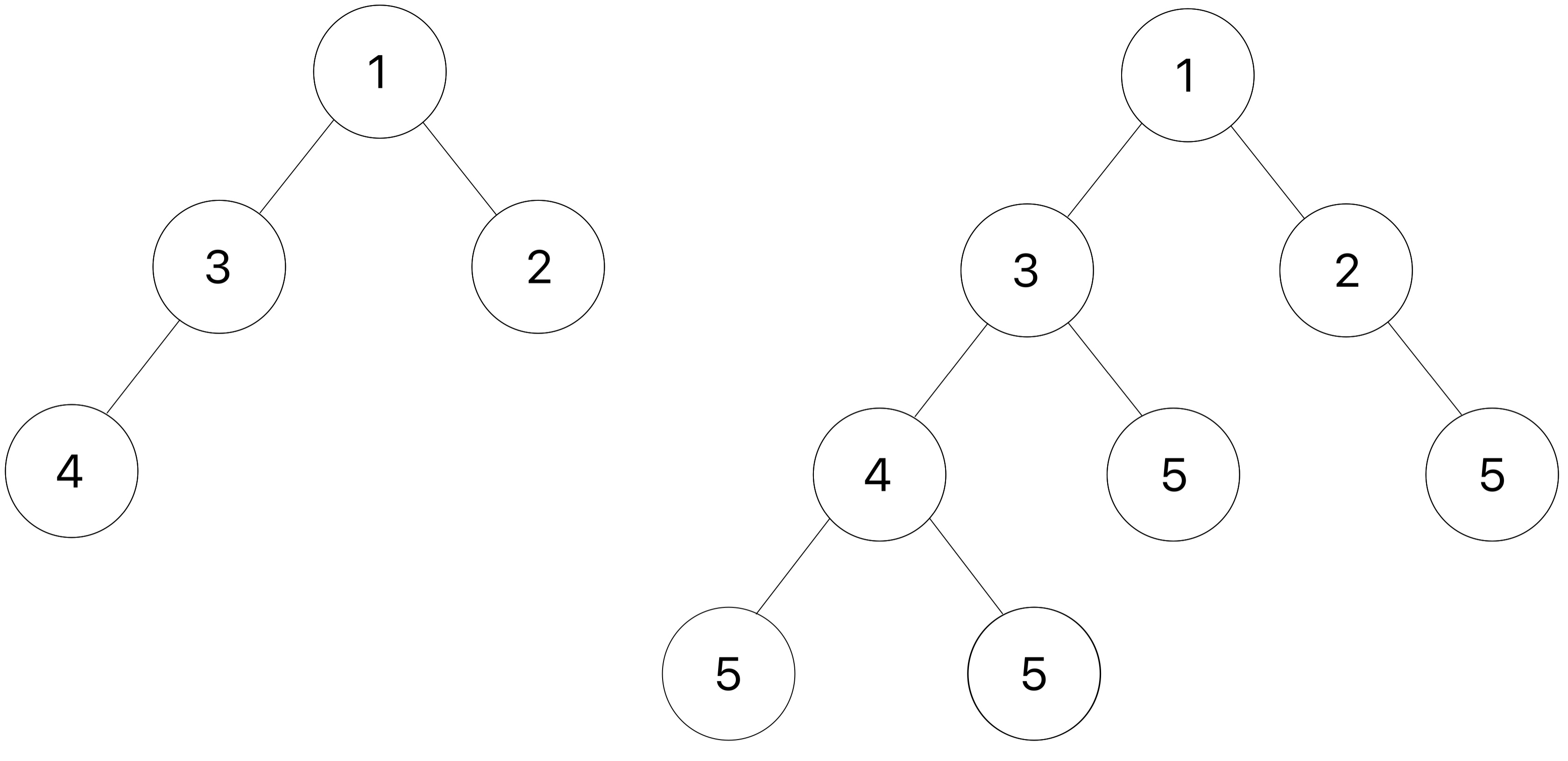
Hint: Use a helper function to keep track of the depth!
Hint: Be careful about when you add the new leaves to the tree. We only want to add leaves to the original nodes in the tree, not to the nodes we added.
Take a look at the doctests below and try drawing out the second doctest to visualize how the function is mutating
t3.
def add_d_leaves(t, v):
    """Add d leaves containing v to each node at every depth d.

    >>> t_one_to_four = Tree(1, [Tree(2), Tree(3, [Tree(4)])])
    >>> print(t_one_to_four)
    1
      2
      3
        4
    >>> add_d_leaves(t_one_to_four, 5)
    >>> print(t_one_to_four)
    1
      2
        5
      3
        4
          5
          5
        5

    >>> t0 = Tree(9)
    >>> add_d_leaves(t0, 4)
    >>> t0
    Tree(9)
    >>> t1 = Tree(1, [Tree(3)])
    >>> add_d_leaves(t1, 4)
    >>> t1
    Tree(1, [Tree(3, [Tree(4)])])
    >>> t2 = Tree(2, [Tree(5), Tree(6)])
    >>> t3 = Tree(3, [t1, Tree(0), t2])
    >>> print(t3)
    3
      1
        3
          4
      0
      2
        5
        6
    >>> add_d_leaves(t3, 10)
    >>> print(t3)
    3
      1
        3
          4
            10
            10
            10
          10
          10
        10
      0
        10
      2
        5
          10
          10
        6
          10
          10
        10
    """
    "*** YOUR CODE HERE ***"
Use Ok to test your code:
python3 ok -q add_d_leavesQ3: Has Path
Write a function has_path that takes in a Tree t and a string target. It
returns True if there is a path that starts from the root where the entries
along the path spell out the target, and False otherwise. You may assume
that every node's label is exactly one character.
This data structure is called a trie, and it has a lot of cool applications, such as autocomplete.
def has_path(t, target):
    """Return whether there is a path in a Tree where the entries along the path
    spell out a particular target.

    >>> greetings = Tree('h', [Tree('i'),
    ...                        Tree('e', [Tree('l', [Tree('l', [Tree('o')])]),
    ...                                   Tree('y')])])
    >>> print(greetings)
    h
      i
      e
        l
          l
            o
        y
    >>> has_path(greetings, 'h')
    True
    >>> has_path(greetings, 'i')
    False
    >>> has_path(greetings, 'hi')
    True
    >>> has_path(greetings, 'hello')
    True
    >>> has_path(greetings, 'hey')
    True
    >>> has_path(greetings, 'bye')
    False
    >>> has_path(greetings, 'hint')
    False
    """
    assert len(target) > 0, 'no path for empty target.'
    "*** YOUR CODE HERE ***"
Use Ok to test your code:
python3 ok -q has_pathQ4: Preorder
Define the function preorder, which takes a Tree instance and
returns a list of all the labels in the tree in the order that
they appear when the tree is printed.
The following diagram shows the order that the nodes would get printed, with the arrows representing function calls.
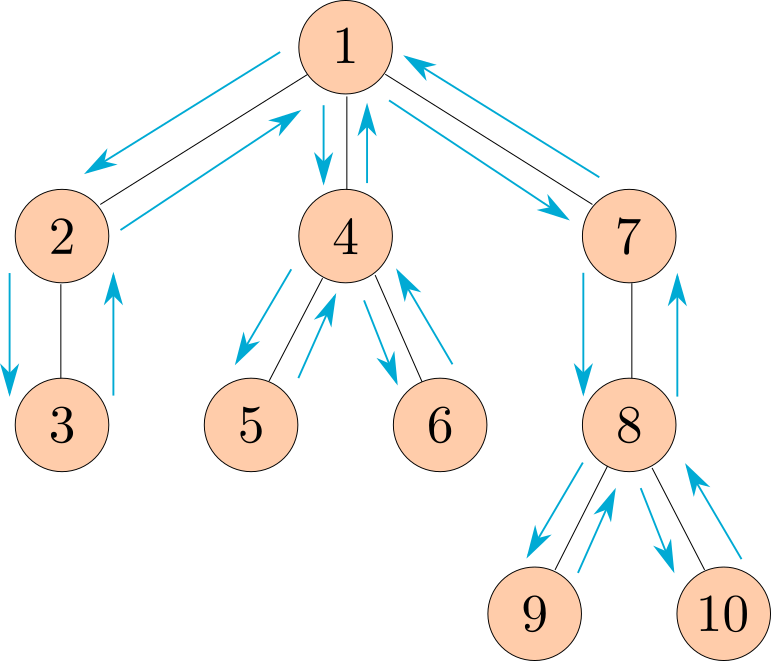
This ordering of the nodes in a tree is called a preorder traversal.
def preorder(t):
    """Return a list of the entries in this tree in the order that they
    would be visited by a preorder traversal (see problem description).

    >>> numbers = Tree(8, [Tree(2), Tree(9, [Tree(4), Tree(5)]), Tree(6, [Tree(7)])])
    >>> print(numbers)
    8
      2
      9
        4
        5
      6
        7
    >>> preorder(numbers)
    [8, 2, 9, 4, 5, 6, 7]
    """
    "*** YOUR CODE HERE ***"

class Tree:
    """A tree has a label and a list of branches.

    >>> t = Tree(3, [Tree(2, [Tree(5)]), Tree(4)])
    >>> t.label
    3
    >>> t.branches[0].label
    2
    >>> t.branches[1].is_leaf()
    True
    """
    def __init__(self, label, branches=[]):
        self.label = label
        for branch in branches:
            assert isinstance(branch, Tree)
        self.branches = list(branches)

    def is_leaf(self):
        return not self.branches

    def __repr__(self):
        if self.branches:
            branch_str = ', ' + repr(self.branches)
        else:
            branch_str = ''
        return 'Tree({0}{1})'.format(repr(self.label), branch_str)

    def __str__(self):
        return '\n'.join(self.indented())

    def indented(self):
        lines = []
        for b in self.branches:
            for line in b.indented():
                lines.append('  ' + line)
        return [str(self.label)] + lines
Use Ok to test your code:
python3 ok -q preorderQ5: Level Mutation Link
As a reminder, the depth of a node is defined as the number of edges from the root to the node. Therefore, the root itself has a depth of 0 since there are no edges between the root and itself.
Given a tree t and a linked list of one-argument functions funcs, write a function that mutates the labels of t using the functions from funcs at the corresponding depths. For example:
- The label at the root node (depth 0) will be mutated using the function at depth 0 of
funcs(funcs.first). - The label at the first level of the tree will be mutated using the function at depth 1 of
funcs(funcs.rest.first), and so on.
Each function in funcs takes in a label value and returns a valid label value.
If a node is a leaf and there are remaining functions in funcs, all of these remaining functions should be applied in order to the label of the leaf node. If funcs is empty, the tree should remain unmodified.
Please refer to the doctests for examples.
def level_mutation_link(t, funcs):
	"""Mutates t using the functions in the linked list funcs.

	>>> t = Tree(1, [Tree(2, [Tree(3)])])
	>>> funcs = Link(lambda x: x + 1, Link(lambda y: y * 5, Link(lambda z: z ** 2)))
	>>> level_mutation_link(t, funcs)
	>>> t    # At level 0, apply x + 1; at level 1, apply y * 5; at level 2 (leaf), apply z ** 2
	Tree(2, [Tree(10, [Tree(9)])])
	>>> t2 = Tree(1, [Tree(2), Tree(3, [Tree(4)])])
	>>> level_mutation_link(t2, funcs)
	>>> t2    # Level 0: 1+1=2; Level 1: 2*5=10 => 10**2 = 100, 3*5=15; Level 2 (leaf): 4**2=16
	Tree(2, [Tree(100), Tree(15, [Tree(16)])])
	>>> t3 = Tree(1, [Tree(2)])
	>>> level_mutation_link(t3, funcs)
	>>> t3    # Level 0: 1+1=2; Level 1: 2*5=10; no further levels, so apply remaining z ** 2: 10**2=100
	Tree(2, [Tree(100)])
	"""
	if _____________________:
		return
	t.label = _____________________
	remaining = _____________________
	if __________________:
		while _____________________:
			_____________________
			remaining = remaining.rest
	for b in t.branches:
		_____________________
Use Ok to test your code:
python3 ok -q level_mutation_linkCheck Your Score Locally
You can locally check your score on each question of this assignment by running
python3 ok --scoreThis does NOT submit the assignment! When you are satisfied with your score, submit the assignment to Gradescope to receive credit for it.
Submit Assignment
Submit this assignment by uploading any files you've edited to the appropriate Gradescope assignment. Lab 00 has detailed instructions.
Correctly completing all questions is worth one point. Please ensure your TA has taken your attendance before leaving.
