Lab 10: Interpreters, Tail Calls
Due by 11:59pm on Thursday, July 30.
Starter Files
Download lab10.zip.
Attendance
You need to submit the lab problems in addition to attending to get credit for lab.
If you miss lab for a good reason (such as sickness or a scheduling conflict) or you don't get checked in for some reason, email cs61a@berkeley.edu within one week to receive attendance credit.
Required Questions
Quasiquotation
Consult the drop-down if you need a refresher on quasiquotation. It's okay to skip directly to the questions and refer back here should you get stuck.
The normal quote ' and the quasiquote ` are both valid ways to quote an
expression. However, the quasiquoted expression can be unquoted with the
"unquote" , (represented by a comma). When a term in a quasiquoted expression
is unquoted, the unquoted term is evaluated, instead of being taken as literal text.
This mechanism is somewhat akin to using f-strings in Python, where expressions
inside {} are evaluated and inserted into the string.
scm> (define a 5)
a
scm> (define b 3)
b
scm> `(* a b)  ; Quasiquoted expression
(* a b)
scm> `(* a ,b)  ; Unquoted b, which evaluates to 3
(* a 3)
scm> `(* ,(+ a b) b)  ; Unquoted (+ a b), which evaluates to 8
(* 8 b)
Q1: WWSD: Quasiquote
Use Ok to test your knowledge with the following "What Would Scheme Display?" questions:
python3 ok -q wwsd-quasiquote -u
scm> '(1 x 3)
______(1 x 3)
scm> (define x 2)
______x
scm> `(1 x 3)
______(1 x 3)
scm> `(1 ,x 3)
______(1 2 3)
scm> `(1 x ,3)
______(1 x 3)
scm> `(1 (,x) 3)
______(1 (2) 3)
scm> `(1 ,(+ x 2) 3)
______(1 4 3)
scm> (define y 3)
______y
scm> `(x ,(* y x) y)
______(x 6 y)
scm> `(1 ,(cons x (list y 4)) 5)
______(1 (2 3 4) 5)Interpreters
It is recommended to consult the Calculator drop-down for the questions below. Consult the other drop-downs if you need a refresher on interpreters. It's okay to skip directly to the questions and refer back here should you get stuck.
An interpreter is a program that allows you to interact with the computer using a specific language. It takes the code you write, interprets it, and then executes the corresponding actions, often using a more fundamental language to communicate with the computer hardware.
In Project 4, you'll develop an interpreter for the Scheme programming language using Python. Interestingly, the Python interpreter you've been using throughout this course is primarily written in the C programming language. At the lowest level, computers operate by interpreting machine code, which is a series of ones and zeros that instructs the computer on performing basic tasks such as arithmetic operations and data retrieval.
When we talk about an interpreter, there are two languages at work:
- The language being interpreted: For Project 4, this is the Scheme language.
- The implementation language: This is the language used to create the interpreter itself, which, for Project 4, will be Python.
REPL
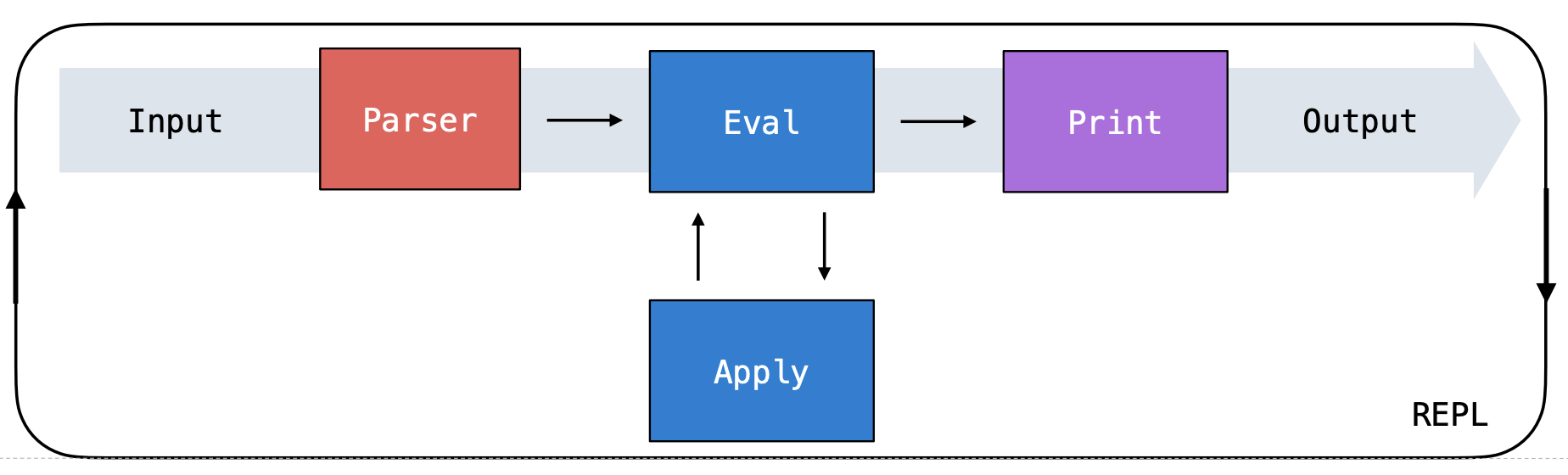
A common feature of interpreters is the Read-Eval-Print Loop (REPL), which processes user inputs in a cyclic fashion through three stages:
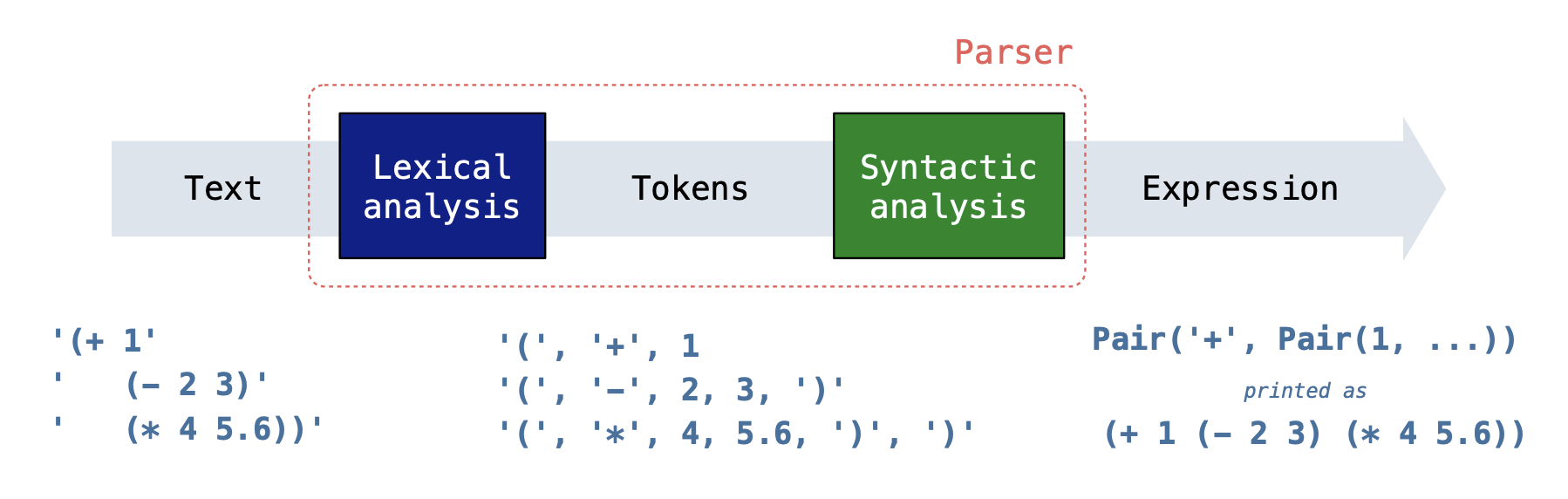
Read: The interpreter first reads the input string provided by the user. This input goes through a parsing process that involves two key steps:
- The lexical analysis step breaks down the input string into tokens, which are the basic elements or "words" of the language you're interpreting. These tokens represent the smallest units of meaning within the input.
The syntactic analysis step takes the tokens from the previous step and organizes them into a data structure that the underlying language can understand. For our Scheme interpreter, we assemble the tokens into a
Linkobject (similar to aLink), to represent the structure of the original call expression.- The first item in the
Linkrepresents the operator of the call expression, while the subsequent elements are the operands or arguments upon which the operation will act. Note that these operands can also be call expressions themselves (nested expressions).
- The first item in the
Below is a summary of the read process for a Scheme expression input:
Eval: This step evaluates the expressions you've written in that programming language to obtain a value. It involves the following two functions:
evaltakes an expression and evaluates it based on the language's rules. When the expression is a call expression,evaluses theapplyfunction to obtain the result. It will evaluate the operator and its operands in order. For example, in(add 1 2),evalwould identifyaddas the operator and1and2as the operands. It evaluatesaddto ensure it's a valid function and then evaluates1and2to ensure they're valid arguments.applytakes the evaluated operator (the function) and applies it to the evaluated operands (the arguments). Note that it's possible that, during this process,applyneeds to evaluate more expressions (like those found within the function body). This is whereapplymay call back toeval, and thus these two stages are mutually recursive.
- Print: Display the result of evaluating the user input.
Here's how all the pieces fit together:
Evaluation
To evaluate the expression (+ (* 3 4) 5) using the interpreter,
scheme_eval is called on the following expressions (in this order):
(+ (* 3 4) 5)+(* 3 4)*345
The * is evaluated because it is the operator sub-expression of (* 3 4),
which is an operand sub-expression of (+ (* 3 4) 5).
By default, * evaluates to a procedure that multiplies its arguments together.
But * could be redefined at any time, and so the symbol * must be evaluated
each time it is used in order to look up its current value.
scm> (* 2 3)  ; Now it multiplies
6
scm> (define * +)
*
scm> (* 2 3)  ; Now it adds
5
Calculator
An interpreter is a program that executes programs. Today, we will extend the interpreter for Calculator, a simple made-up language that is a subset of Scheme. This lab is like the Scheme Project in miniature.
The Calculator language includes only the four basic arithmetic operations: +, -, *, and /. These operations can be nested and can take various numbers of arguments, just like in Scheme. A few examples of calculator expressions and their corresponding values are shown below.
 calc> (+ 2 2 2)
 6

 calc> (- 5)
 -5

 calc> (* (+ 1 2) (+ 2 3 4))
 27
Calculator expressions are represented as Python objects:
- Numbers are represented using Python numbers.
- The symbols for arithmetic operations are represented using Python strings (e.g.
'+'). - Call expressions are represented using the
Linkclass below.
To represent Scheme lists in Python, we will use the Link class (in both this lab and the Scheme project). A Link instance has two attributes: first and rest. Link is always called on two arguments. To make a list, nest calls to Link and pass in nil as the second argument of the last Link.
Note: In the Python code,
nilis bound toLink.empty. Similarly,nilin Scheme evaluates to an empty list.
For example, once our interpreter reads in the Scheme expression (+ 2 3), it is represented as Link('+', Link(2, Link(3, nil))).
>>> p = Link('+', Link(2, Link(3, nil)))
>>> p.first
'+'
>>> p.rest
Link(2, Link(3, nil))
>>> p.rest.first
2
>>> print(p)
(+ 2 3)
There is a map_link function that takes a one-argument Python function f and a linked list s. It returns the Scheme list that results from applying f to each element of the Scheme list.
>>> map_link(lambda x: 2 * x, p.rest)
Link(4, Link(6, nil))
Here is the Link class and map_link function (__str__ and __repr__ methods not
shown).
class Link:
    """Represents the built-in Link data structure in Scheme."""
    empty = ()
    def __init__(self, first, rest):
        self.first = first
        self.rest = rest

nil = Link.empty

def map_link(f, s):
    """Map function f over linked list s.
    >>> square = lambda x: x * x
    >>> map_link(square, Link(1, Link(2, Link(3))))
    Link(1, Link(4, Link(9, nil)))
    """
    if s is Link.empty:
        return s
    return Link(f(s.first), map_link(f, s.rest))
Q2: Using Link
Answer the following questions about a Link instance
representing the Calculator expression (+ (- 2 4) 6 8).
Use Ok to test your understanding:
python3 ok -q using_link -uCalculator Evaluation
For Question 3 (New Procedure), you'll need to update the calc_eval function below, which evaluates a Calculator expression. For Question 3, you'll determine what the operator and operands are for a call expression in Scheme as well as how to apply a procedure to arguments in the calc_apply line.
def calc_eval(exp):
    """
    >>> calc_eval(Link("define", Link("a", Link(1, nil))))
    'a'
    >>> calc_eval("a")
    1
    >>> calc_eval(Link("+", Link(1, Link(2, nil))))
    3
    """
    if isinstance(exp, Link):
        operator = ____________ # UPDATE THIS FOR Q2, e.g (+ 1 2), + is the operator
        operands = ____________ # UPDATE THIS FOR Q2, e.g (+ 1 2), 1 and 2 are operands
        if operator == 'and': # and expressions
            return eval_and(operands)
        elif operator == 'define': # define expressions
            return eval_define(operands)
        else: # Call expressions
            return calc_apply(___________, ___________) # UPDATE THIS FOR Q2, what is type(operator)?
    elif exp in OPERATORS:   # Looking up procedures
        return OPERATORS[exp]
    elif isinstance(exp, int) or isinstance(exp, bool):   # Numbers and booleans
        return exp
    elif exp in bindings:   # Looking up variables
        return bindings[exp]
Q3: New Procedure
Add the // operation to Calculator, a floor-division procedure such that (// dividend divisor) returns the result of dividing dividend by divisor, ignoring the remainder (dividend // divisor in Python). Handle multiple inputs as illustrated in the following example: (// dividend divisor1 divisor2 divisor3) evaluates to (((dividend // divisor1) // divisor2) // divisor3) in Python. Assume every call to // has at least two arguments.
Hint: You will need to modify both the
calc_evalandfloor_divmethods for this question!
calc> (// 1 1)
1
calc> (// 5 2)
2
calc> (// 28 (+ 1 1) 1)
14
Hint: Make sure that every element in a
Link(the operator and all operands) will becalc_eval-uated once so that we can correctly apply the relevant Python operator to operands!
def floor_div(args):
    """
    >>> floor_div(Link(100, Link(10, nil)))
    10
    >>> floor_div(Link(5, Link(3, nil)))
    1
    >>> floor_div(Link(1, Link(1, nil)))
    1
    >>> floor_div(Link(5, Link(2, nil)))
    2
    >>> floor_div(Link(23, Link(2, Link(5, nil))))
    2
    >>> calc_eval(Link("//", Link(4, Link(2, nil))))
    2
    >>> calc_eval(Link("//", Link(100, Link(2, Link(2, Link(2, Link(2, Link(2, nil))))))))
    3
    >>> calc_eval(Link("//", Link(100, Link(Link("+", Link(2, Link(3, nil))), nil))))
    20
    """
    "*** YOUR CODE HERE ***"
Use Ok to test your code:
python3 ok -q floor_divQ4: New Form
Add and expressions to our
Calculator interpreter as well as introduce the Scheme boolean values
#t and #f, represented as Python True and False.
The examples below assumes conditional operators (e.g. <, >, =, etc) have already been implemented,
but you do not have to worry about them for this question.
calc> (and (= 1 1) 3)
3
calc> (and (+ 1 0) (< 1 0) (/ 1 0))
#f
calc> (and #f (+ 1 0))
#f
calc> (and 0 1 (+ 5 1)) ; 0 is a true value in Scheme!
6
In a call expression, we first evaluate the operator, then evaluate the operands, and finally apply the procedure to its arguments (just like you did for floor_div in the previous question).
However, we cannot evaluate and expressions the same way we evaluate call expressions. Since and is a special form that short circuits on the first false argument, we need to add special logic so that we don't always evaluate all of the sub-expressions.
Important: To check whether some
valis a false value in Scheme, useval is scheme_frather thanval == scheme_fbecause in Python0 == Falsebut0 is not False(crazy, right!).
scheme_t = True   # Scheme's #t
scheme_f = False  # Scheme's #f

def eval_and(expressions):
    """
    >>> calc_eval(Link("and", Link(1, nil)))
    1
    >>> calc_eval(Link("and", Link(False, Link("1", nil))))
    False
    >>> calc_eval(Link("and", Link(1, Link(Link("//", Link(5, Link(2, nil))), nil))))
    2
    >>> calc_eval(Link("and", Link(Link('+', Link(1, Link(1, nil))), Link(3, nil))))
    3
    >>> calc_eval(Link("and", Link(Link('-', Link(1, Link(0, nil))), Link(Link('/', Link(5, Link(2, nil))), nil))))
    2.5
    >>> calc_eval(Link("and", Link(0, Link(1, nil))))
    1
    >>> calc_eval(Link("and", nil))
    True
    """
    "*** YOUR CODE HERE ***"
Use Ok to test your code:
python3 ok -q eval_andMacros
Consult the drop-down if you need a refresher on macros. It's okay to skip directly to the questions and refer back here should you get stuck.
A macro is a code transformation that is created using define-macro and
applied using a call expression. A macro call is evaluated by:
- Binding the formal parameters of the macro to the unevaluated operand expressions of the macro call.
- Evaluating the body of the macro, which returns an expression.
- Evaluating the expression returned by the macro in the frame of the original macro call.
scm> (define-macro (twice expr) (list 'begin expr expr))
twice
scm> (twice (+ 2 2))  ; evaluates (begin (+ 2 2) (+ 2 2))
4
scm> (twice (print (+ 2 2)))  ; evaluates (begin (print (+ 2 2)) (print (+ 2 2)))
4
4
Q5: Repeat
Define repeat, a macro that takes a number n and an expression
expr. Calling repeat evaluates expr in a local frame n times, and its value is
the final result. You will find the helper function repeated-call useful, which
takes a number n and a zero-argument procedure f and calls f n number of times.
For example, (repeat (+ 2 3) (print 1)) is equivalent to:
(repeated-call (+ 2 3) (lambda () (print 1)))
and should evaluate (print 1) repeatedly 5 times.
The following expression should print four four times:
(repeat 2 (repeat 2 (print 'four)))
(define-macro (repeat n expr)
  `(repeated-call ,n ___))

; Call zero-argument procedure f n times and return the final result.
(define (repeated-call n f)
  (if (= n 1) ___ (begin ___ ___)))
Use Ok to test your code:
python3 ok -q repeat-lambdaThe repeated-call procedure takes a zero-argument procedure, so
(lambda () ___) must appear in the blank. The body of the lambda
is expr, which must be unquoted.
Call f on no arguments with (f). If n is 1, just call f. If n is
greater than 1, first call f and then call (repeated-call (- n 1) f).
Tail Calls
Tail Calls Refresher
A recursive call is a tail call if it is the last thing the function does.
Example of a Tail Call:
(define (fact n total)
  (if (= n 0)
      total
      (fact (- n 1) (* total n))))
As you can see above, the last thing that happens is a call to fact. There is nothing left to do in this frame, so we can close it and move onto the next.
Example of a function without a tail call:
(define (fact n)
  (if (= n 0)
      1
      (* n (fact (- n 1)))))
As you can see above, the (fact (- n 1)) call must return and then be multiplied by n. Meaning, we have to keep that frame open until the call has completed and we can multiply.
This is important because Tail-recursive functions use constant space unlike non-Tail-recursive functions which can use linear or more space.
After the recursive call returns, is there any work left to do?
- If yes, then it is not a tail call.
- If no, then it is a tail call.
Q6: Concatenate
Write a tail-recursive function concatenate, which takes in s, a list of lists,
and concatenates all the elements together into one list.
Hint: Recall the built-in
appendfunction
(define (concatenate s)
'YOUR-CODE-HERE
)
Use Ok to unlock and test your code:
python3 ok -q concatenate -u
python3 ok -q concatenateCheck Your Score Locally
You can locally check your score on each question of this assignment by running
python3 ok --scoreThis does NOT submit the assignment! When you are satisfied with your score, submit the assignment to Gradescope to receive credit for it.
Submit Assignment
Submit this assignment by uploading any files you've edited to the appropriate Gradescope assignment. Lab 00 has detailed instructions.
Correctly completing all questions is worth one point. Please ensure your TA has taken your attendance before leaving.